
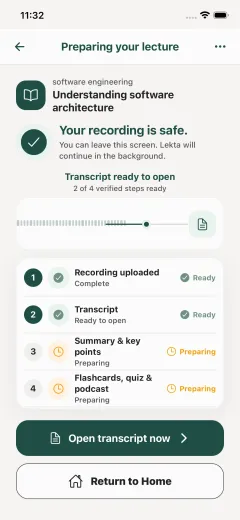
Return through the transcript
After processing, use the searchable transcript to find the topic, example, or explanation you want to hear again. Recording conditions and source quality affect the result.
From source to study path
Lekta keeps a permitted recording connected to its course, then helps you return through a searchable transcript, concise notes, and study formats available for the source and your plan.
RecordingWhy the next step matters
Raw audio can be difficult to scan when you need one explanation or a quick review before class. Lekta is designed to keep later study tied to the lecture instead of turning the source into an unrelated block of AI text.
After processing, use the searchable transcript to find the topic, example, or explanation you want to hear again. Recording conditions and source quality affect the result.
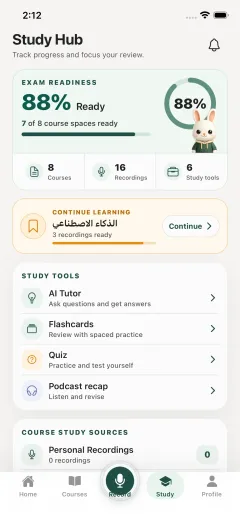
Use concise notes or a summary to identify the main ideas, then return to the source when wording, context, or detail matters.
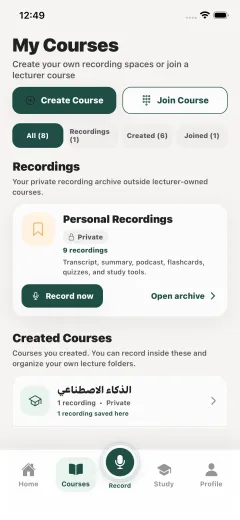
Where the released feature, source, and plan permit it, move into flashcards, quizzes, podcast recaps, AI study help, or course study packs without losing the course connection.
Keep the course together
Lekta organizes recordings and their study material by course. That gives each transcript or summary a place to return to later, whether you are reviewing this week’s topic or preparing across several lectures.
Check what matters
Transcripts, notes, summaries, flashcards, quizzes, recaps, and AI responses can be incomplete or wrong. Check important details against the lecture and official course guidance.
Read how lecture content is handledYou are responsible for following local law and institutional rules and obtaining every permission required before recording or uploading audio.
Read the permission-first guideA mobile lecture-to-study workflow
Lekta’s public website explains the product; it is not a browser upload tool. Explore the recording workflow, then join the launch list while the public iOS and Android listings are still coming soon.